Free & Open Source
Back up your Android, your way
Browse, transfer, and manage files on any Android device from your browser — over USB or Wi-Fi, with pause & resume, conflict detection, and a built-in file viewer.
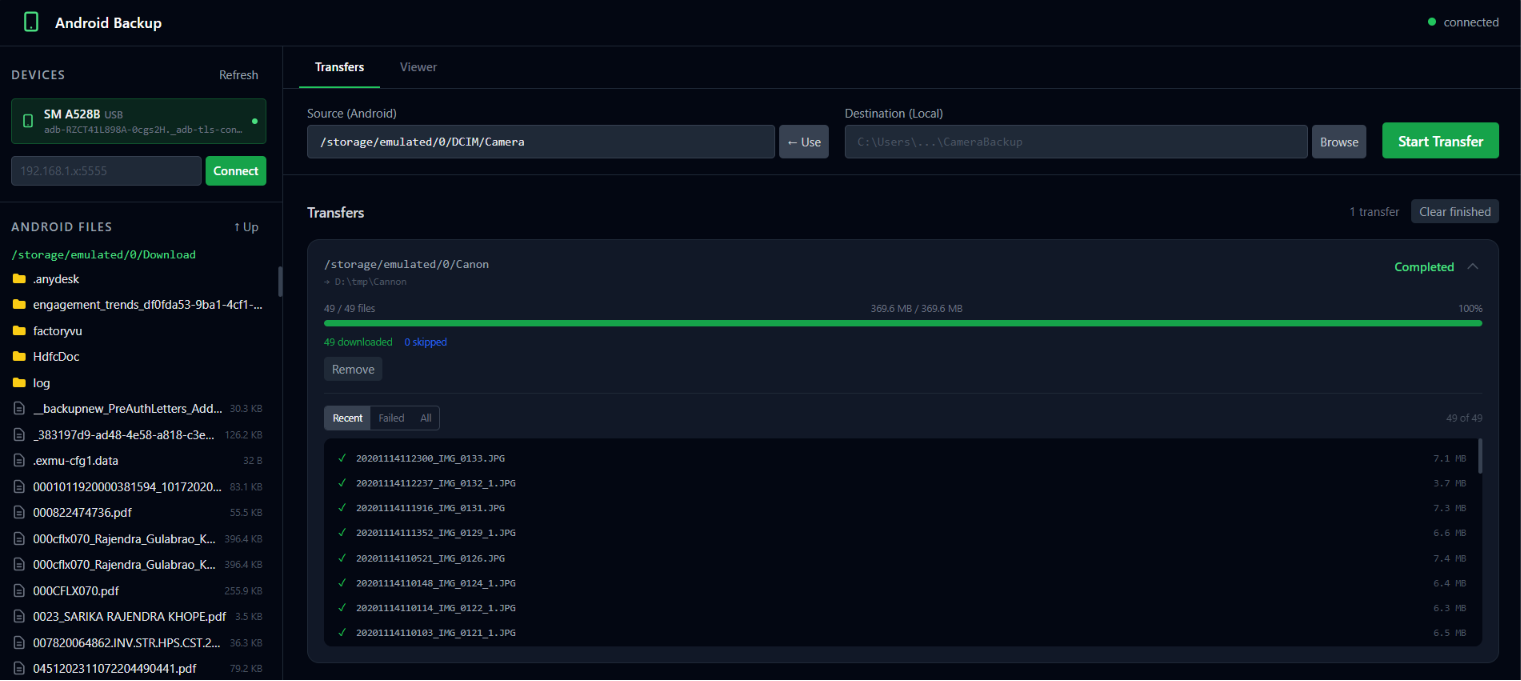
Browse, transfer, and manage files on any Android device from your browser — over USB or Wi-Fi, with pause & resume, conflict detection, and a built-in file viewer.
A tiny Go binary starts a local web server on port 8765.
Open your browser, pick a device, browse to a folder, and click Start Transfer.
Everything runs entirely on your machine — no cloud, no account, no data leaves your network.
No installation wizard. No cloud. Just ADB and a browser.
Connect via cable or wirelessly. Pair over USB once, then go cord-free. Multi-device support — handle several phones at once.
Stop mid-transfer and pick up exactly where you left off. Files already at their full size are skipped automatically.
Navigate the full Android filesystem. Rename, delete, or move files and folders directly from the browser.
Preview images, videos (with seeking), audio, PDFs, and text files without leaving the app. Files are cached locally.
Live transfer queue with per-file logs, done/skipped/failed counts, and a filterable file log panel via WebSocket.
Runs entirely on your local machine on port 8765. No accounts, no telemetry, no cloud upload — your files stay yours.
Up and running in under two minutes.
You need ADB (Platform Tools) in your PATH
and USB Debugging enabled on your Android device
(Settings → Developer options → USB Debugging).
# Download the latest release
Invoke-WebRequest -Uri https://github.com/bkrajendra/android_backup/releases/latest/download/androidbackup-windows-amd64.exe -OutFile androidbackup.exe

# Run it
.\androidbackup.exe# Linux x64
curl -L https://github.com/bkrajendra/android_backup/releases/latest/download/androidbackup-linux-amd64 -o androidbackup
chmod +x androidbackup && ./androidbackupNavigate to http://localhost:8765. Your connected Android devices appear immediately — select one, browse to a folder, and click Start Transfer.
adb tcpip 5555,
then unplug the cable. In the app, type your phone's IP address in the Connect field and click Connect.
Single binary — no installer, no dependencies beyond ADB.
Binaries are built automatically from source via GitHub Actions on every push. View build history →